RAG and its Patterns
In this article we will go in depth details of RAG (Retrieval Augmented Generation)
LLM
With the invention of LLMs (Large Language Models) there is a revolution in how we build applications and how we use applications. This has opened a new door of inventions and efficiency for the business to automate the workflows with the use of LLMs.
Problem with LLM
With LLM we have a problem that is Knowledge cutoff i.e., it has the answers/ context of something which it has been trained on it doesn’t know anything out of it. I doesn’t even know the current date. Because of this knowledge cutoff we cannot get real-time data answers from the LLMs.
Simple but costly solution
There is a solution for the above issue with LLMs (the knowledge cutoff) i.e., fine-tuning.
Fine-tuning : Fine tuning is a process of training the LLM with the data we have so that it can respond to user queries with the new context of data .
Example: Lets say we have a big enterprise and it has its support chat with user queries and support technician response. We can feed this to LLM and fine-tune and now with this we can make the LLM answer the questions which has context to enterprise issues.
Problem with Fine-tuning:
This is time consuming
It will need lot of hardware resource to train
It is very expensive
Time to time we need to train it with new data we have (kind of knowledge cutoff)
RAG → The solution for expensive/extensive Fine-tuning
RAG is way to enhance the LLM with out using expensive Fine tuning to change the parameters of the LLM
Instead of changing the parameters of LLM this process will try to get the response from the external source (this can be a DB , api etc )
This is in basic get the relevant result and inject that to the prompt, which inturn gives a tailored response according the system prompt
System Prompt: A pre-written set of instructions that guides the AI models behaviour , responses with the user interactions
This is because of context window.
The context window is something the no of tokens an LLM can process.
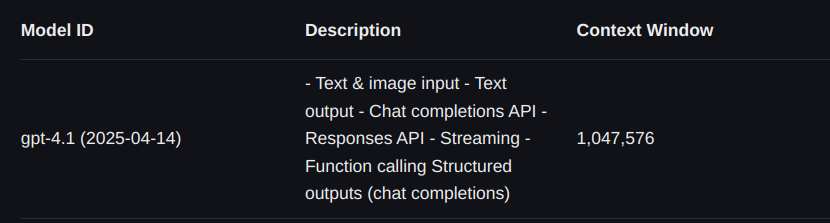
The latest GPT 4.1 has approx 1 M token token window. If we give extra token it slide the window by removing the old tokens
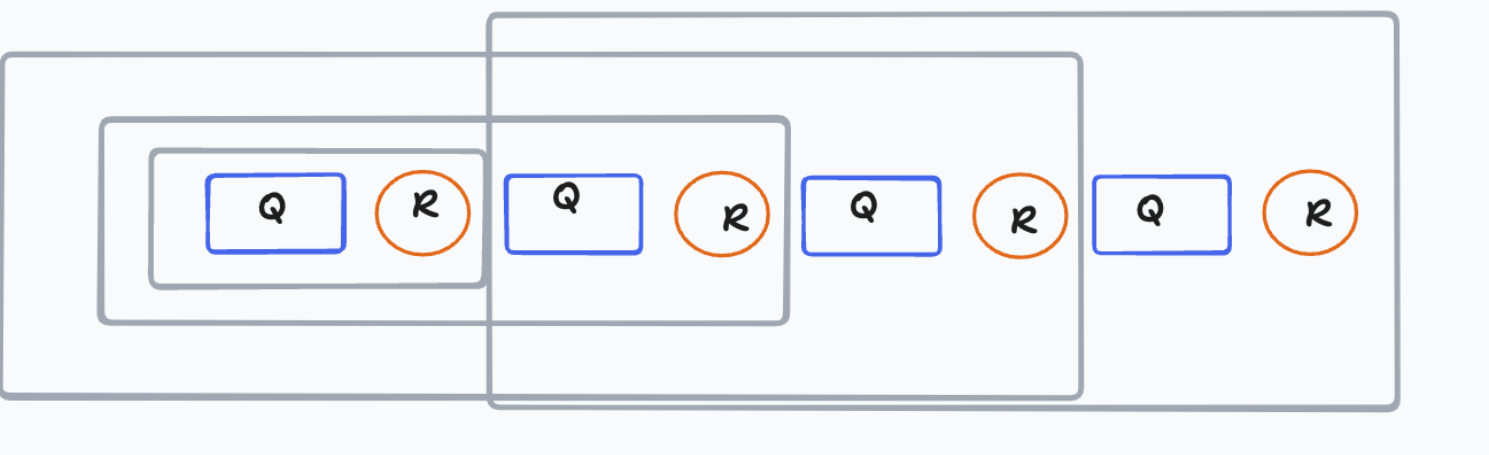
Example:
So when ever we chat with GPT every time it takes entire chat to process the output because of which it will get the context of what we are talking it.
Basic RAG Flow
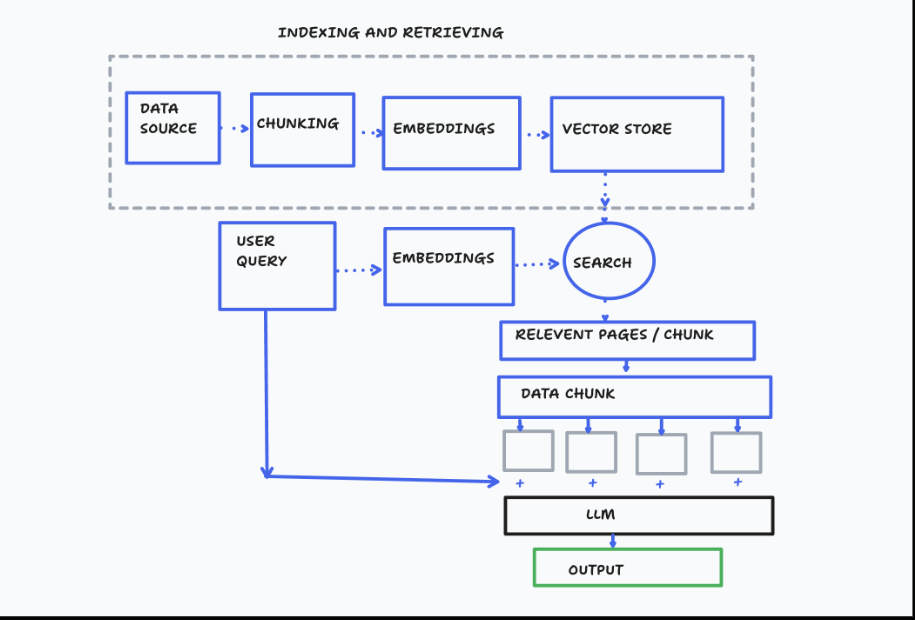
The RAG process mainly 2 parts:
Ingestion
Retrieval
Ingestion:
This is the part where we take the data (any kind lets assume that user is sending a PDF and want to chat with it )
In this we cannot send entire data to LLM (remember the context window) we need to respect that and give the data according to it.
First part in ingestion is to take the data from data source make it in to chunks and index it.
After chunking/indexing part we will take any LLM embedding model and make this data chunks in to vector embedding ( This will get the sematic meaning to it) with metadata
We will store this output embedding in to a vector DB ( this will be our LLM source to retrieve the data)
We can use any vector DB ( qDrant, pinecone etc)
Retrieval:
This is the part where we take the user query give system prompt to the LLM and provide some context of what it is and what is needs to do.
First we will take the user query and make the vector embeddings out of it and give it to the vector db as query and will search with it
With the query we will get some chunks as result , we can do two approaches here take the data in chunk and feed it to LLM and get the response or take the chunks and go to the source again and from that get bigger chunk with more context and feed that to LLM which might give little more accurate response to the User.
For all the above process we will use langchain, Langchain is a framework works with (python /js ) where all these process are made it in to simple reusable functions where we can just use it them and get things done.
This is called Langchain because we are doing a sequence of calls with help of this framework , whether that might be to the LLM or to an external source.
Okay enough of the theory lets dive in to the implementation part.
Lets start with Ingestion part
In ingestion the first part is to load the source data (here it is a PDF ) . we will be building a simple resume LLM ai
pdf_path= Path(__file__).parent/"Anusha_Kongara_Resume.pdf"

# load the file using pypdf
loader = PyPDFLoader(file_path=pdf_path)
docs = loader.load()
After loading the PDF we will split it with characters
# preload the textsplitter with confifurations
text_splitter = RecursiveCharacterTextSplitter(
    chunk_size=1000,
    chunk_overlap=200
)

# split with configurations using the docs from loader
split_docs = text_splitter.split_documents(documents=docs)
Store the split embedded chunks to vector DB , here we are using qDrant DB Lets spin up this using docker compose
services:
  qdrant:
    image: qdrant/qdrant
    ports:
      - 6333:6333
we will choose the embedder to make our chunks embed before inserting to vector DB
# create the vector embeddings
embedder = GoogleGenerativeAIEmbeddings(
    model='models/text-embedding-004',
    google_api_key=os.environ["GEMINI_AI_KEY"]
)
After spinning up the vector DB we will try to ingest the embedd data to this vector DB
#To ingest the data to vector db /qdrant db
vector_store = QdrantVectorStore.from_documents(
    documents=[],
    url="http://localhost:6333",
    collection_name="learning_langchain",
    embedding=embedder
)

vector_store.add_documents(documents=split_docs)
print("Ingestion Done")
Now we will try to do the Retrievel part
First we will try to create a system prompt to let the LLM know what it is and what it should do
system_prompt =f"""
You are an AI assistant who can answer the user query by comprehensively analysing the user query and you will get the response from the db assistant which will be a resume related response and u will take the response from  assistant  and  make it as a good response to the user with out the metdata page numbers etc you get. The response should be more brief and tailored for the user from the response you get from the db assistant , give the respone in 30 words only make it consice

Rules:
- take content from assistant which is wrapped in <result> </result>  that is the response you have make it good intrepretable as user can understand
- Give the reponse in three pointers only
- Take the resposne from assistante and traslate it as good response from as a AI assistant
- You will also get todays date from a assistant wrapped with <date></date> use it for any requirements especially to calculate the no of years of experience
- After taking response from "assistant" cut out other information which is not realted to "user" query
"""
After this we will take the input from the user , embed and search for similarity in the vector DB
user_query =input(">")

retriever = QdrantVectorStore.from_existing_collection(
    collection_name="learning_langchain",
    embedding=embedder,
    url="http://localhost:6333"
)


search_result = retriever.similarity_search(
    query=user_query
)
Now comes the part where the LLM comes in place we will send the entire system prompt user query and search results to LLM
llm = ChatGoogleGenerativeAI(
    model="gemini-2.0-flash-001",
    temperature=0,
    max_tokens=100,
    timeout=None,
    max_retries=2,
    google_api_key=os.environ["GEMINI_AI_KEY"]
    # other params...
)

result_content_db =""
for result in search_result:
    #print(f"{result.page_content} : {result.metadata}")
    result_content_db+=result.page_content

#print(result_content_db)
messages =[{"role":"system","content":system_prompt},{"role":"user","content":user_query},
           {"role":"assistant","content":f"<date>{datetime.datetime.now()}</date>"},{"role":"assistant","content":f"<result>{result_content_db}</result>"}]

ai_response=llm.invoke(messages)
print(ai_response.content)
Hurray!!! we have build a simple resume chat RAG application. :)
Here is the gist for entire code.
From here we will continue to improve this RAG … How lets see in another blog…
————> To be continued