Introduction to LangGraph
This article gives us brief introduction of LangGraph with a simple workflow
LangGraph — used by Replit, Uber, LinkedIn, GitLab and more — is a low-level orchestration framework for building controllable agents. While langchain provides integrations and composable components to streamline LLM application development, the LangGraph library enables agent orchestration — offering customizable architectures, long-term memory, and human-in-the-loop to reliably handle complex tasks.
This the official definition of LangGraph in their docs. Lets break this down and learn what it actually does.
With langchain we have learnt it makes out work easy by giving us utility functions and chaining pattern to get our worflow with LLMs done very easily.
Here in LangGraph it is more of architecture , how the workflow is designed, it gives us structure to design our workflows. This is called orchestration.
Lets break down the pattern of langGraph and how this orchestration is done.
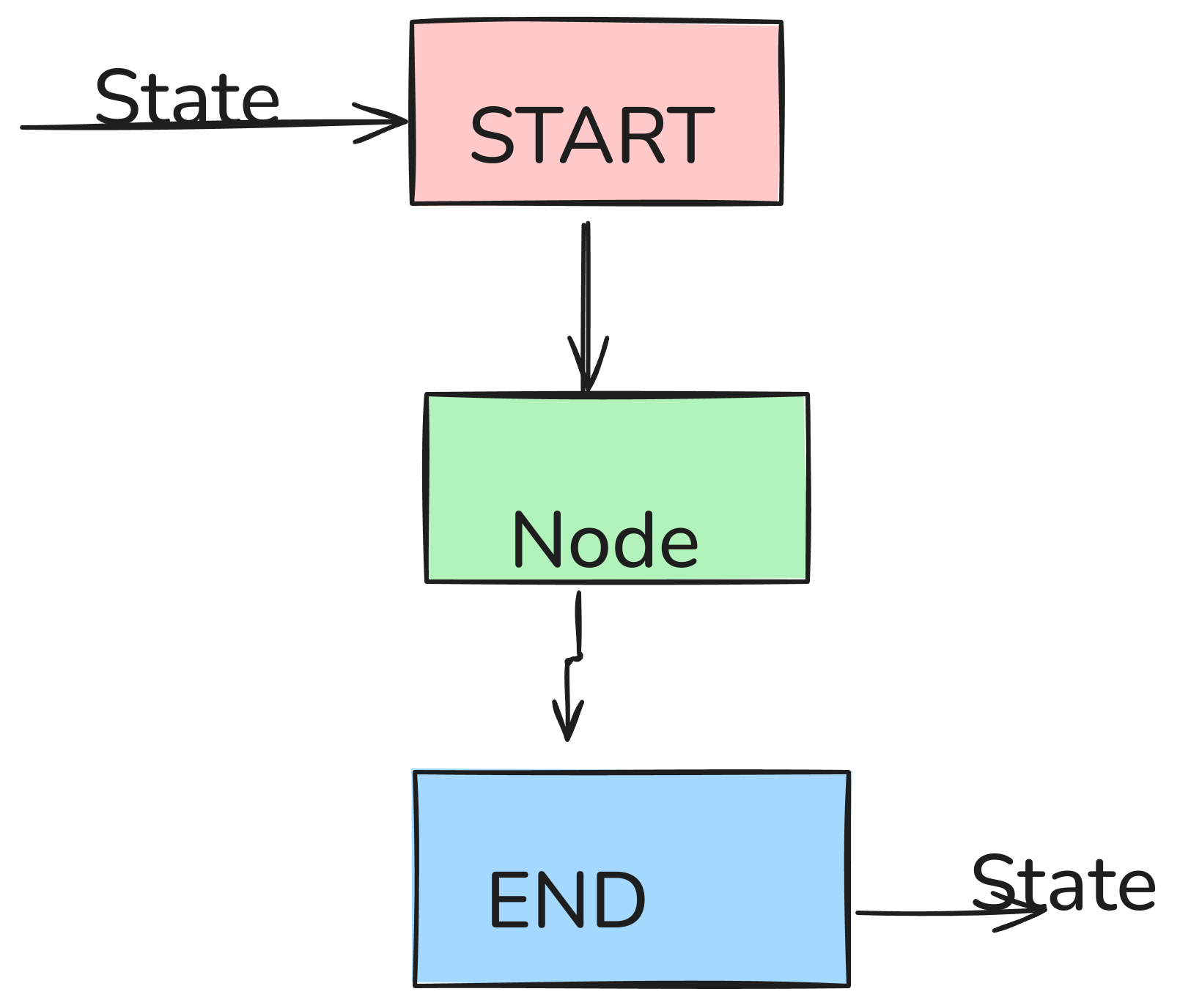
Here we can see there are set of nodes and with input and output each node takes input as a state and outputs a state, START and END are also nodes here. In the nodes we will have a code block which will take the state as input and returns the state as output that’s it.
The State variable will always hold the current state of the variable means if the node returns the state with some x modification the universal state will also have the same modification in fact it will be modifiying the same universal state every time
Lets try to code a simple workflow where we will get the input from user and if the question is coding related we will route that to a coding node if not we will move that to simple AI node at the end we will get the reply.
class DetectCallResponse(BaseModel):
    is_question_ai: bool

class CodingAIResponse(BaseModel):
    answer: str
Initially we will declare the response types of the LLM so that we know what we are getting from it
class State(TypedDict):
    user_message: str
    ai_message: str
    is_coding_question: bool
we will create the global state which is used at all the nodes as input and output
client = OpenAI()
We will create an instance of OpenAI() to use it in nodes
def detect_query(state: State):
    user_message = state.get("user_message")

    SYSTEM_PROMPT = """
    You are an AI assistant. Your job is to detect if the user's query is related
    to coding question or not.
    Return the response in specified JSON boolean only.
    """

    # OpenAI Call
    result = client.beta.chat.completions.parse(
        model="gpt-4o-mini",
        response_format=DetectCallResponse,
        messages=[
            { "role": "system", "content": SYSTEM_PROMPT },
            { "role": "user", "content": user_message }
        ]
    )

    state["is_coding_question"] = result.choices[0].message.parsed.is_question_ai
    return state
This is a simple node where we try to detect the user query is coding or not we will get a boolean from the AI here
def route_edge(state: State) -> Literal["solve_coding_question", "solve_simple_question"]:
    is_coding_question = state.get("is_coding_question")

    if is_coding_question:
        return "solve_coding_question"
    else:
        return "solve_simple_question"
Here we are declaring an edge (means it route the state to a node) where it decides according to the state input to which node it needs to invoke with state
def solve_coding_question(state: State):
    user_message = state.get("user_message")

    # OpenAI Call (Coding Question gpt-4.1)
    SYSTEM_PROMPT = """
    You are an AI assistant. Your job is to resolve the user query based on coding
    problem he is facing
    """

    # OpenAI Call
    result = client.beta.chat.completions.parse(
        model="gpt-4.1",
        response_format=CodingAIResponse,
        messages=[
            { "role": "system", "content": SYSTEM_PROMPT },
            { "role": "user", "content": user_message }
        ]
    )
    state["ai_message"] = result.choices[0].message.parsed.answer

    return state
Here we will have another node which does its simple job to invoke ai and get response from it
def solve_simple_question(state: State):
    user_message = state.get("user_message")

    # OpenAI Call (Coding Question gpt-mini)
    SYSTEM_PROMPT = """
    You are an AI assistant. Your job is to chat with user
    """

    # OpenAI Call
    result = client.beta.chat.completions.parse(
        model="gpt-4o-mini",
        response_format=CodingAIResponse,
        messages=[
            { "role": "system", "content": SYSTEM_PROMPT },
            { "role": "user", "content": user_message }
        ]
    )
    state["ai_message"] = result.choices[0].message.parsed.answer

    return state
Another one for simple user query where we can use small models to answer
graph_builder = StateGraph(State)
Here we are building the graph_builder with state we have lot of things to do with it
graph_builder.add_node("detect_query", detect_query)
graph_builder.add_node("solve_coding_question", solve_coding_question)
graph_builder.add_node("solve_simple_question", solve_simple_question)
graph_builder.add_node("route_edge", route_edge)
In the above code with unique string we have declared or added all the code blocks as node, so now with the str it will know which code to invoke
graph_builder.add_edge(START, "detect_query")
graph_builder.add_conditional_edges("detect_query", route_edge)

graph_builder.add_edge("solve_coding_question", END)
graph_builder.add_edge("solve_simple_question", END)
Here we are adding edges , edges are routes… The every graph has start and end so as we have declared our code blocks with unique string we can use it here to tell langGraph where to start and end
graph = graph_builder.compile()
we will compile and use it to invoke when requires
Below is the code for invokation
def call_graph():
    state = {
        "user_message": "Hello ji!",
        "ai_message": "",
        "is_coding_question": False
    }

    result = graph.invoke(state)


    print("Final Result", result)

call_graph()
As this is a simple question the traversal should be as shown below
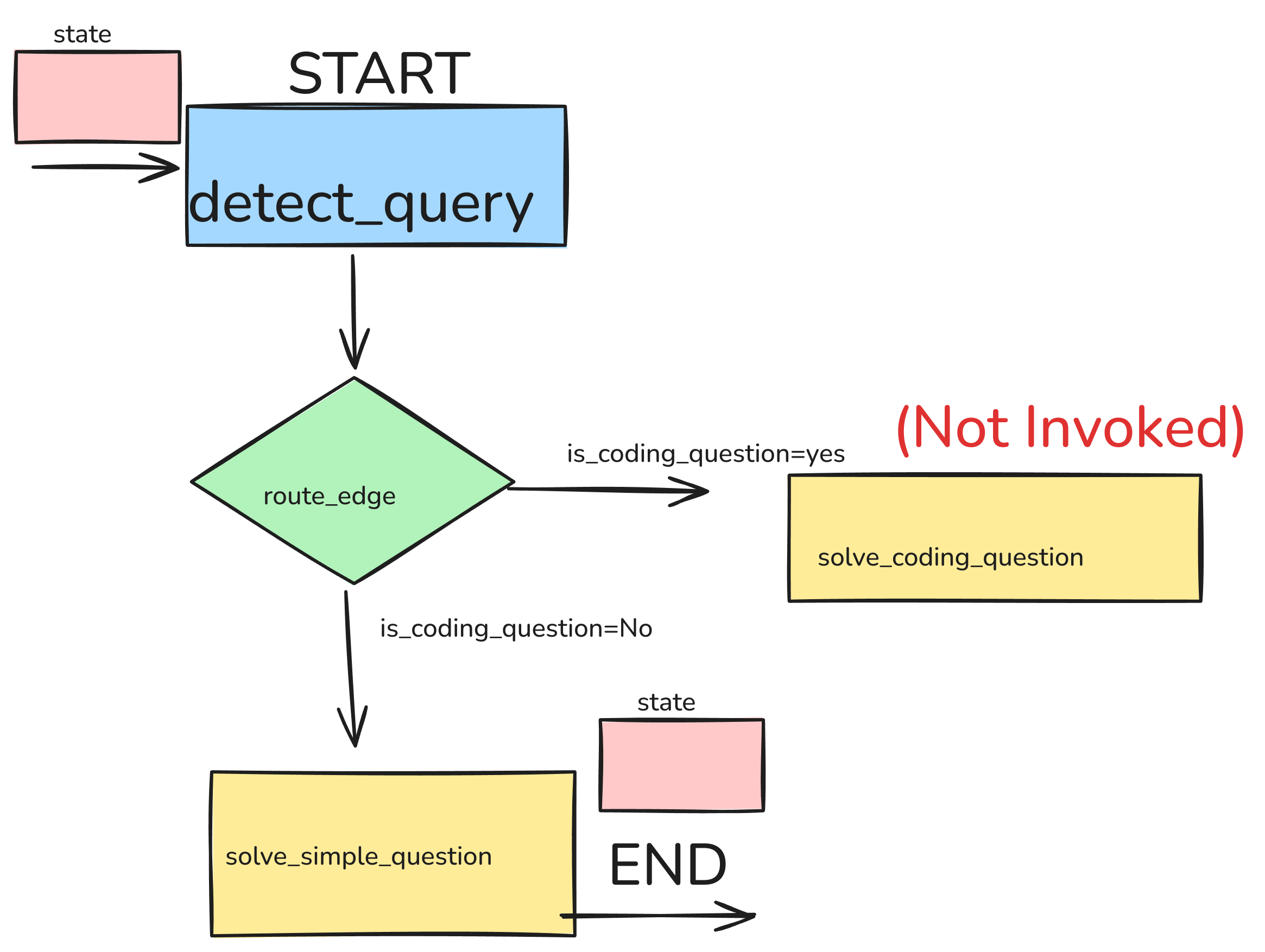
If you have any experience with AWS step function the architecture looks same and it will be more easier to understand langGraph
Thanks for Reading…
Comments
Join the discussionNo comments yet. Be the first to comment.