2. Kubernetes Core
In this part we will be looking at k8s core components where we will going through the concepts of pods , replicasets , deployments etc
Kubectl
This is the command line tool which is used to communicate to k8s
Docker vs Containerd
The k8s right now supports Container Runtime Interface, The containerd has the support for CRI but the docker doesn’t . Previously to run docker the k8s used to support docker shim along with CRI but after the containerd(the main engine of docker) separated from docker this support has been removed.
We have tool like nerdctl ,crictl to interact with containerd
Pods
The pods are smallest unit in k8s that we can spin up with cluster
When we deploy containers in k8s it will encapsulate the container inside a
podIdeally there will be a one container running inside a
podThe
podwill have a network, volume etc as a shared resourceThere are multiple commands to run a
podin k8s usually we do it wil yml fileIf we want to scale up the application we can add more
podsin a node or add more nodes withpods
commands
To create a pod
kubectl run ngnix —image=nginx
To get all pods
kubectl get pods
Basic yml configuration components in k8s
Yml Configuration
apiVersion:
kind:
metadata:
spec:
For simple pod definition file
apiVersion: v1
kind: Pod
metadata:
    name: myapp-pod # This is name which is reserved key the name of the pod
    labels:      # The labels are essential to get the pods by reference
        app: myapp
        type: front-end
spec:
    containers: # here its an array of container we have given only 1 we can add more
        - name: nginx-container
          image: nginx
Version Table:
| Kind | Version |
| Pod | v1 |
| Service | v1 |
| ReplicaSet | apps/v1 |
| Deployment | apps/v1 |
Commands to run the yml to generate pods
- Command to create a pod
kubectl create -f pod-definition.yml
- To get pods
kubectl get pods
- To describe pods
kubectl describe pod <pod_name>
- To delete pod
kubectl delete pod <pod_name>
Replica Set or Replication Controller
Problem: When we are running a pod in k8s cluster , then suddenly there will be lot of users hitting the same pod in this case there is a chance of Pod going down. In this case replicasets or replicationcontroller will help us by maintaining the desired number of replicas. Even the pod goes down this will create new.
ReplicationController → v1
ReplicaSet → apps/v1
Note: Even if there is one replica given in the yaml definition file the replicacontroller or replicaset will make sure that one replica pod is up and running consistently
| Replica Controller | ReplicaSet |
| Takes pod definition to create replicas. Selector is optional. | Takes labels through the selector to map replicas, if any fails then takes the template in to consideration. With this if there are any existing pods with same labels as in selector as considered as part of replicaset |
Replication Controller
apiVersion: v1
kind: ReplicationController
metadata:
    name: nginx
spec:
    replicas: 3 # the no of replicas we need
    selector:   # this is where it matches the label with pod def labels
        app: nginx
    template: # from here its just the pod def without apiversion and kind
        metadata:
            name: nginx
            labels:
                app: nginx
        spec:
            containers:
                - name: nginx
                  image: nginx
                  ports:
                    - containerPort: 80
ReplicaSet Container
apiVersion: apps/v1
kind: ReplicaSet
metadata:
  name: frontend
  labels:
    app: guestbook
    tier: frontend
spec:
  replicas: 3
  selector:
    matchLabels:  # here there will be matchlabels which will be used to match labels globally in k8s cluster
      tier: frontend
  template:
    metadata:
      labels:
        tier: frontend
    spec:
      containers:
      - name: php-redis
        image: us-docker.pkg.dev/google-samples/containers/gke/gb-frontend:v5
The labels are important in replicas because we can tell that replicaset to watch the pod with specific label
If we spin up an pod with same label when replica set is applied it will kill that pod as it will be an extra pod
Commands for replicaset:
# To create a replicaset/replicationcontroller
kubectl create -f <replication-set.yml>

# To get all replicasets

kubectl get replicaset

# To delete a particular replicaset

kubectl delete replicaset <name> # This deletes all the underlying pods

# To replace / update replicaset
kubetcl replace -f <replica-set.yml>

# To scale using commands
kubectl scale --replicas=6 -f <name.yml>

# To edit replicaset using name
kubectl edit replicaset <name>

# To scale replicaset using name

kubectl scale replicaset <name> --replicas=5
Deployments
Deployment are of a kind in k8s
It auto pulls from registry
Roll updates one by one
any error can roll back
Pause or resume updates
This is top in hierarchy
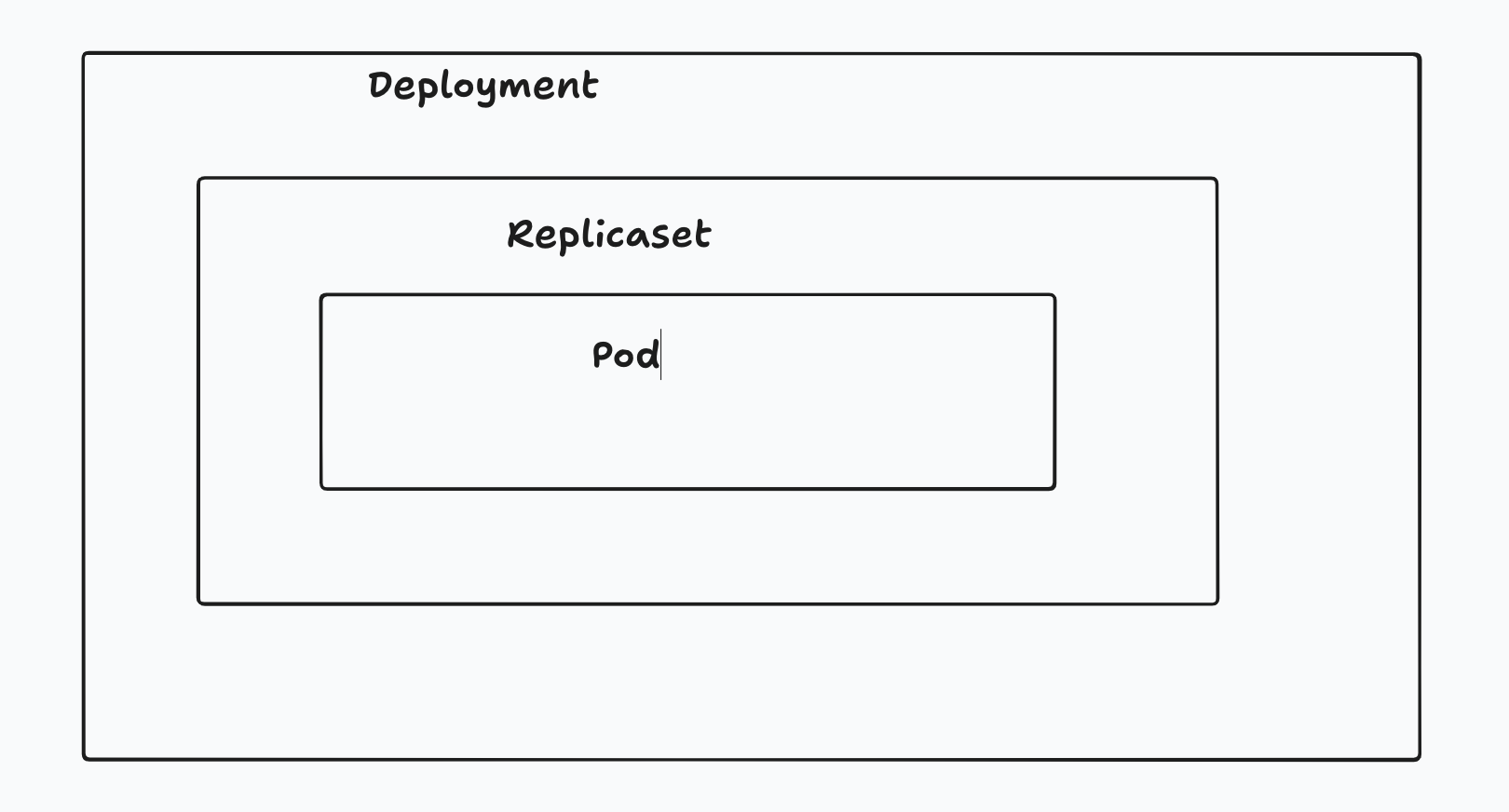
The only diff between replicaset and deployment is kind in perspective of yml file
Why: When we try to deploy new version of the application, we might do all at once but the deployment will do one by one which is called rolling updates where the application high availability is not compromised
What: Deployment is top in hierarchy where it will manage the entire deployment , rolling updates and when somethings goes wrong we can do rollback also using the deployment
How: The syntax is same as replicaset just change the kind to deployment
commands
# To get all
kubectl get all

# To create deployment

kubectl create -f <deployment.yml>

# To get deployments

kubectl get deployments
The deployment has 2 strategies
Recreate : takes down and update (has downtime)
Rollout: rolls out one by one (no downtime)
commands for deployment
# stratergies

kubectl rollout status <deployment_name>

kubectl rollout history <deployment_name>

# rollback

kubectl rollout rundo <deployment_name>
Namespace
What : Namespace is a way to segregate deployments, pods and services in k8s. It is an isolated environment where we can create all the components we need
Why: When we want to use diff envs dev,sit,uat,prod and have diff resource usages, we can create different k8s for that and use it.
How: In namespace a resource inside namespace can call another resource with name of the resource if it is in another namespace we should have called with domain name , namespace name and service name
By default k8s will have
Kube-system
default
kube-public
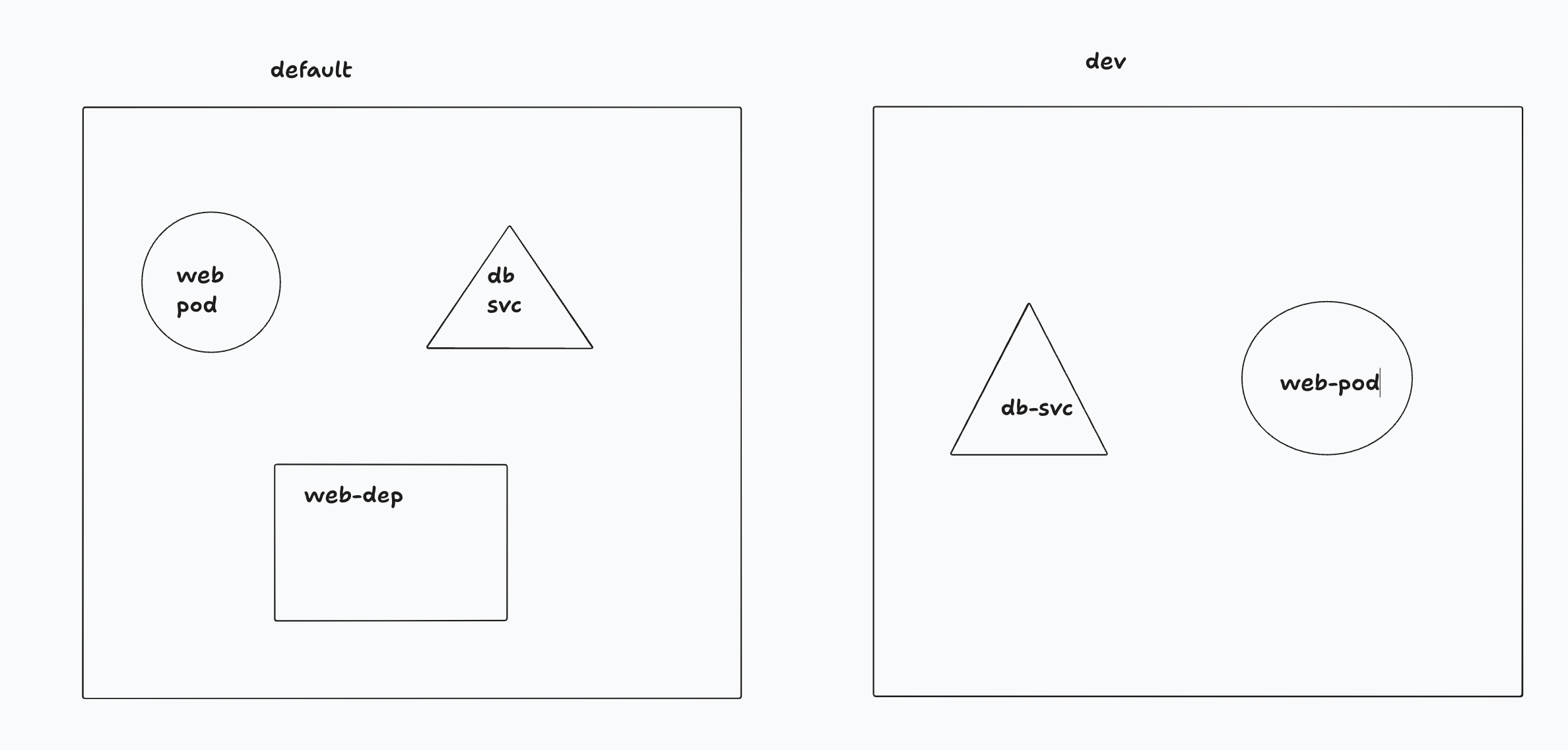
To connect inside default namespace from default we can use
mysql.connect(‘db-svc’)
To connect from default to dev
db-svc.dev.svc.cluster.local
svc name → namespace→ service → domain
Commands:
# To get all pods in a namespace
kubectl get pods --namespace=<name>

# To create pod,svc,deployment inside a namespace

kubectl create -f <name.yml> --namespace=dev

# we can also do it by adding namespace in yml file

# To create namespace by using file
----------file----------------
apiVersion: v1
kind: NameSpace
metadata:
    name: dev
-------------eof---------------

# To create namespace using yml

kubectl create -f <name.yml>

# To create without def file

kubectl create <name> dev

# To change the default namespace so that we may need not to use the --namespace

kubectl config set-context $(kubectl config-context) --namespace=<name>

# To get pods from all namespaces

kubectl get pods --all-namespaces